Practical WebSocket Implementation
Table of Contents
- Those who know WebSocket is a bidirectional connection for real-time communication but feel lost when trying to implement it
- Those who want to understand what to consider when applying WebSocket to a real service
When building a service using WebSocket, you may wonder how to receive user information. In HTTP, you can include Authorization information in the Header, but since WebSocket doesn't have Headers, you cannot receive user information that way.
The first method for handling authentication via WebSocket is sending it as a Query String in the URI.
wss://chavo.dev/?key=USER_API_KEY
Sending it as a Query String in the URI is simple and easy to implement, but since API_KEY information is exposed in the URI, it's best used only on the server-side. You can strengthen security by quickly expiring the API_KEY, but since the connection is disconnected every time the API_KEY changes, this isn't a good method for real services as it degrades user experience.
The second method is sending authentication information via JWT when opening the Connection.
JWT stands for JSON Web Token and is the most commonly used authentication method for handling user information in HTTP. Just as you put JWT in the Authorization Header when using it in HTTP, in WebSocket, you can use a method of sending the JWT when opening the Connection to remember user information.

Actual authentication method used by Channel Talk, a customer messenger SaaS program
Tip 💡
You can check how WebSocket works on a website through Developer Tool > Network > ws in Google Chrome.

Let's implement JWT authentication in Django Channels using the method above. Django Channels is a library that allows you to use WebSocket in Django.
Channels provides a class called Consumer to handle events needed for WebSocket, and you can create separate classes to add authentication or other abstractions needed for your service.
The documentation recommends storing information about the connection in Scope.
Scope is in dict format, and you can store user information in scope['user'].
Below is example code that creates a class called AuthWebsocketConsumer to handle Authentication.
class AuthWebsocketConsumer(WebsocketConsumer):
    def receive(self, text_data=None, bytes_data=None):
        # Case: Already user authentication is finished
        if "user" in self.scope:
            pass
        else:
            data = json.loads(text_data)["data"]
            if "token" in data.keys():
                # Get token from data
                token = data["token"].encode("utf-8")
                # Custom function to fetch user from token
                user = fetch_user_from_token(token)
                self.scope["user"] = user

        # Case: User Authentication is not working
        if "user" not in self.scope:
            self.close()
class MyServiceConsumer(AuthWebsocketConsumer):
    ...
    def receive(self, text_data=None, bytes_data=None):
        super(MyServiceConsumer, self).receive(text_data, bytes_data)
    ...
WebSocket connections are easily disconnected. Besides cases where the server dies, WebSocket connections can be broken when WiFi is disconnected, when connecting to a different WiFi network, or when the network is temporarily interrupted.
Let's look at how to attempt reconnection when the connection is lost to handle these cases.
The simplest solution would be code like this:
function connect() {
    ws = new WebSocket("wss://your_server_uri/ws/abc/");
    ws.addEventListener("close", connect);
}
This code attempts to reconnect every time the WebSocket closes. However, this method can put load on the server, and if the server is completely down, it can fall into an infinite loop of connecting and disconnecting.
To solve this problem, we need to control the timing of reconnection.
const initialReconnectDelay = 1000;
const currentReconnectDelay = initialReconnectDelay;
const maxReconnectDelay = 16000; // (2 ** 4) * 1000

function connect() {
    ws = new WebSocket("wss://your_server_uri/ws/abc/");
    ws.addEventListener("open", onWebsocketOpen);
    ws.addEventListener("close", onWebsocketClose);
}

function onWebsocketOpen() {
    currentReconnectDelay = initialReconnectDelay;
}

function onWebsocketClose() {
    ws = null;
    setTimeout(reconnectToWebsocket, currentReconnectDelay);
}

function reconnectToWebsocket() {
    if (currentReconnectDelay < maxReconnectDelay) {
        currentReconnectDelay *= 2;
    }
    connect();
}
By exponentially increasing the reconnection timing based on the number of failures, we can reduce the load on the server in situations where the connection is not established for a long time.
When operating a real service, if the server goes down, all clients in the code above will request at the same timing, which can be a significant burden on the server if there are many clients.
You can reduce server load by randomizing the connection timing as follows:
...
function reconnectToWebsocket() {
    if (currentReconnectDelay < maxReconnectDelay) {
        currentReconnectDelay += Math.floor(Math.random() * currentReconnectDelay);
    }
...
}
When operating a WebSocket server in a real service, you need to add more servers as requests increase. There are two main methods for scaling servers:
Vertical Scaling- improving the performance of the server where WebSocket is runningHorizontal Scaling- having multiple WebSocket servers

When considering infinitely increasing requests, Vertical Scaling has limits in terms of upgradeable server RAM, CPU, Disk, etc.,
but Horizontal Scaling allows you to add servers indefinitely. Therefore, if possible, it's better to choose Horizontal Scaling.
However, let's consider the following case.
In a chat system like KakaoTalk, consider sending a message in a group chat. There are group chats A and B, where Cheolsu and Younghee are in chat A, and Cheolsu and Minsu are in chat B.
When there was only one server initially, you could record information about each chat room on the server and send messages to all users in the chat room whenever a message is sent. But what should you do when another server is added and users in the same chat room are connected to different servers?

In the right situation, when Cheolsu talks in chat B, how should the message be delivered to Minsu?
To solve this situation, we can use the Pub/Sub (publish-subscriber) pattern.
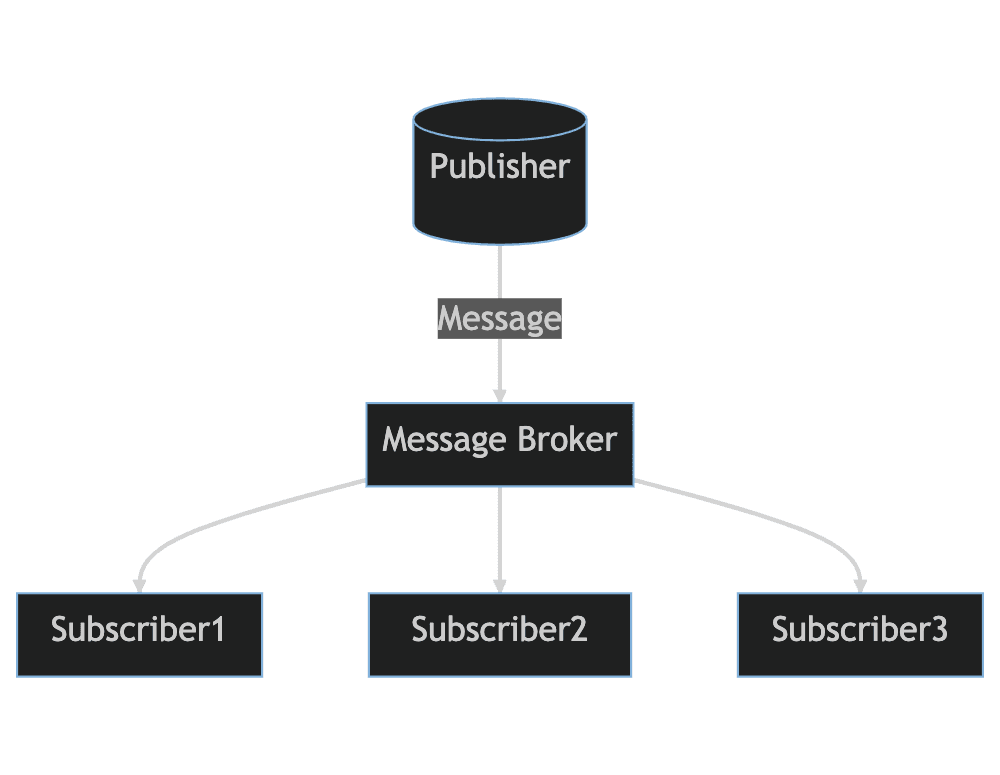
The Pub/Sub pattern, which is already supported by various WebSocket server libraries, is divided into Publisher (typically the server) and Subscriber (typically the client). When the Publisher publishes a message,
it is delivered through a Message Broker to single or multiple Subscribers who need to receive that message.
Business logic is handled in the Publisher and Subscriber, and the Message Broker only serves to deliver messages. This way, Publishers and Subscribers don't need to know about each other, and since they communicate through the Message Broker, there are no service operation issues even when multiple Publishers are added.
We've looked at considerations when applying WebSocket to real services as shown above. If I've missed anything or if there's incorrect information, please let me know in the comments! :)
Thank you for reading!